Add 2-Step Verification Method in Google Account To Increase The Security
Hello
readers today i am going to show you the " 2-Step Verification " method
in Google accounts to add more security . Trust me this is very nice
method to increase the security in your Google account . In
this method you cant login into your account if you don't have a
verification code . If you have your password and your verification code
( Receive on your mobile via SMS or Call ) then only you can login into
Google account .
How To Add " 2-Step Verification " .


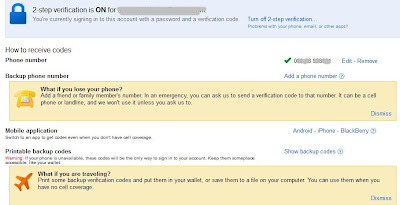
How To Add " 2-Step Verification " .
- Login your Google Account .
- Go to this link : https://www.google.com/accounts/SmsAuthConfig
- Click on " Start Setup "

- On the Next Step " Choose Mobile number and Click on Send Codes "

- You will get codes via sms , Enter those codes and click on Verify .
- On the next step it will ask you for " Trust this Computer " ( If you lose your phone, you might be able to access your account from a trusted computer without needing a code. We recommend that you make this a trusted computer only if you trust the people who have access to it. )
- Click on "NEXT " and Jump to the next Step .
- Click on Confirm and you will see a Page like this below .
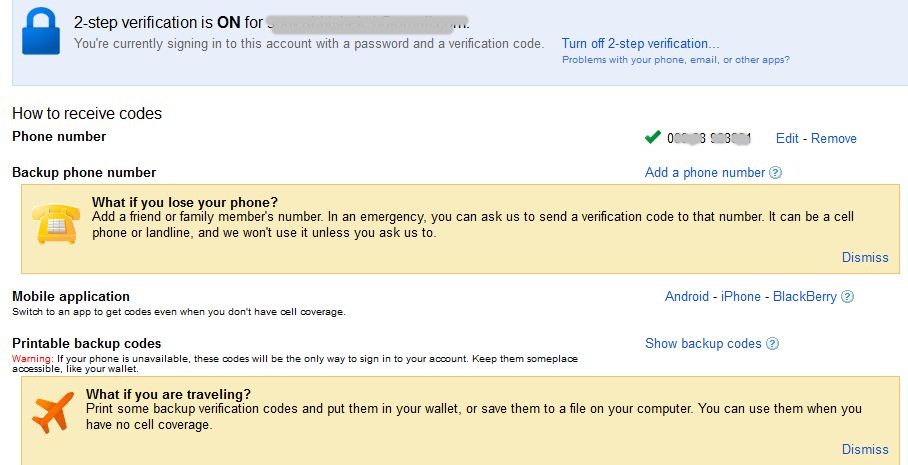
- See there is Option " Backup Phone number " ( suppose if you lost your mobile then what ? now you cant login into your account because you will not get verification code , so this option for this same case . ) In " Backup your number " add your mum , dad or your close friend number . If you lost your number then this second number will help you to Receive Verification Codes .
- " Printable Backup Codes " If you don't have Verification Code then you can use the backup Codesinstead of the Verification Code .
- Note : Each Backup Code can be use only once for verification . Keep these codes secret . Read more there .
 You can also generate new codes by Clicking on Generate new Code .All done :)Now Login into your Account . You will see that you cant login if you don't have Verification code . So Keep your Backup code in some secure place .



Comments
Post a Comment